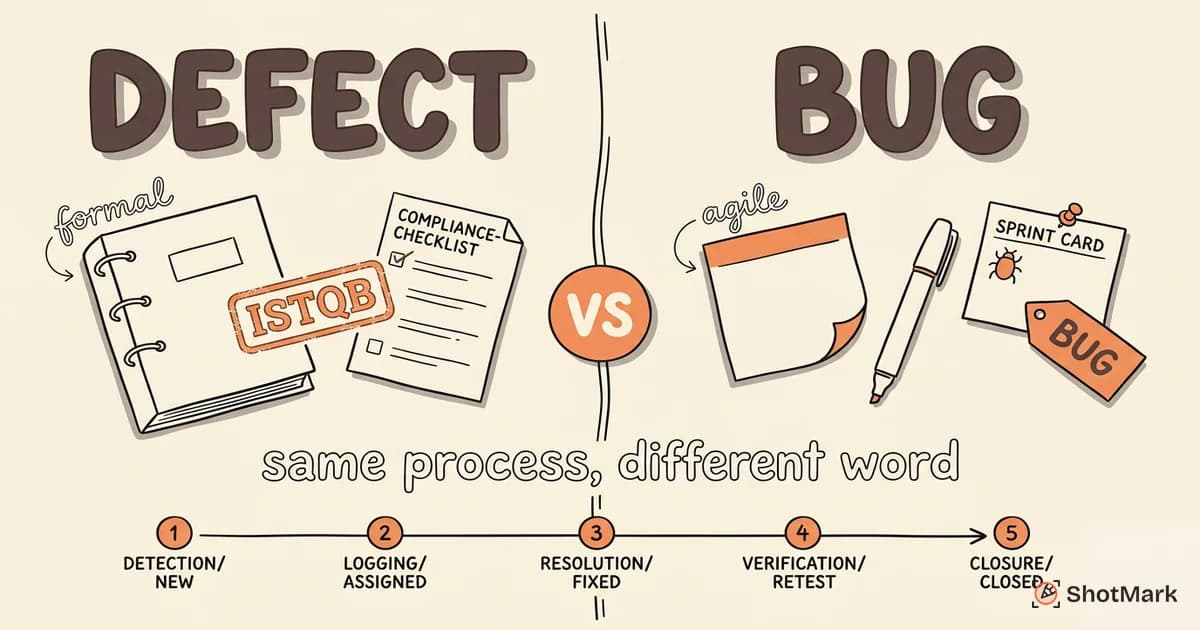
If you have searched for “defect life cycle” and “bug life cycle” separately, you probably noticed the articles look almost identical. That is because, in practice, these terms describe the same process. The defect life cycle and the bug life cycle both trace a flaw from discovery to closure through the same sequence of stages.
The terminology difference matters in one specific context. Here is when you should care about the distinction and when you should not.
Defining the Defect Life Cycle in Software Testing
The term “defect” comes from formal software testing vocabulary. The ISTQB glossary defines a defect as a flaw in a work product found during review or testing. Under this definition, a defect can exist in code, documentation, requirements, or test cases. It is broader than what most developers mean when they say “bug.”
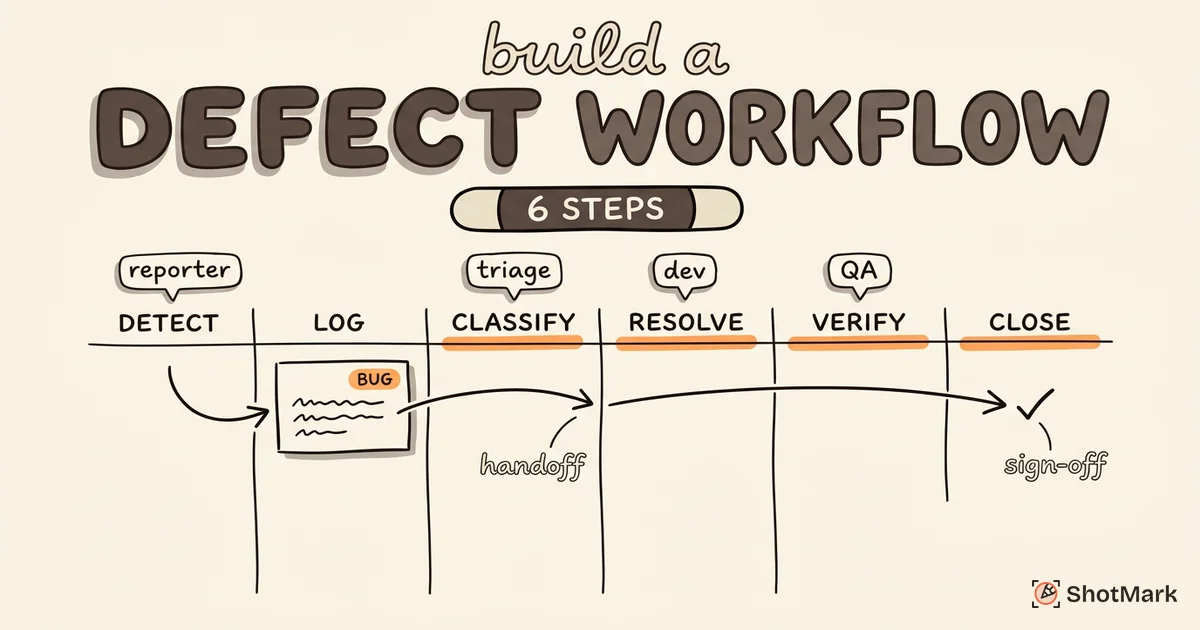
The formal defect life cycle in software testing follows six stages:
- Detection: A tester, developer, or automated tool identifies a flaw during review, testing, or production monitoring.
- Logging: The defect gets documented in a tracking system with reproduction steps, environment details, and supporting evidence.
- Classification: The team assigns severity, priority, type, and affected component. This is where bug severity vs priority decisions happen.
- Resolution: A developer is assigned the defect, implements a fix, and submits it for code review.
- Verification: A tester retests the fix in the target environment to confirm the defect is actually resolved.
- Closure: The defect is marked closed, and the data feeds into metrics and reporting.
Teams that use “defect” over “bug” tend to work in regulated industries (medical devices, financial software, aerospace) or operate under ISTQB-aligned testing frameworks. The formal terminology signals a structured approach where documentation and traceability are non-negotiable. GeeksforGeeks covers these stages in their testing curriculum, and it is a common topic on ISTQB certification exams.
Defining the Bug Life Cycle
“Bug” is the informal, industry-standard word for the same thing. Grace Hopper may or may not have taped an actual moth to a logbook in 1947, but the term stuck. Today, “bug” dominates in agile teams, startups, open-source projects, and developer-facing conversations.
The bug life cycle follows the same stages as the defect life cycle, just with different vocabulary:
- New: A bug is discovered and logged.
- Assigned: The bug is triaged and assigned to a developer.
- Open: The developer starts working on it.
- Fixed: The developer submits a fix.
- Retested: QA verifies the fix.
- Closed (or Reopened if the fix failed).
For a detailed walkthrough of each stage, our bug life cycle guide expands on the seven-stage model that includes an explicit triage step. The Guru99 defect lifecycle tutorial provides another perspective on how these stages map to real testing workflows.
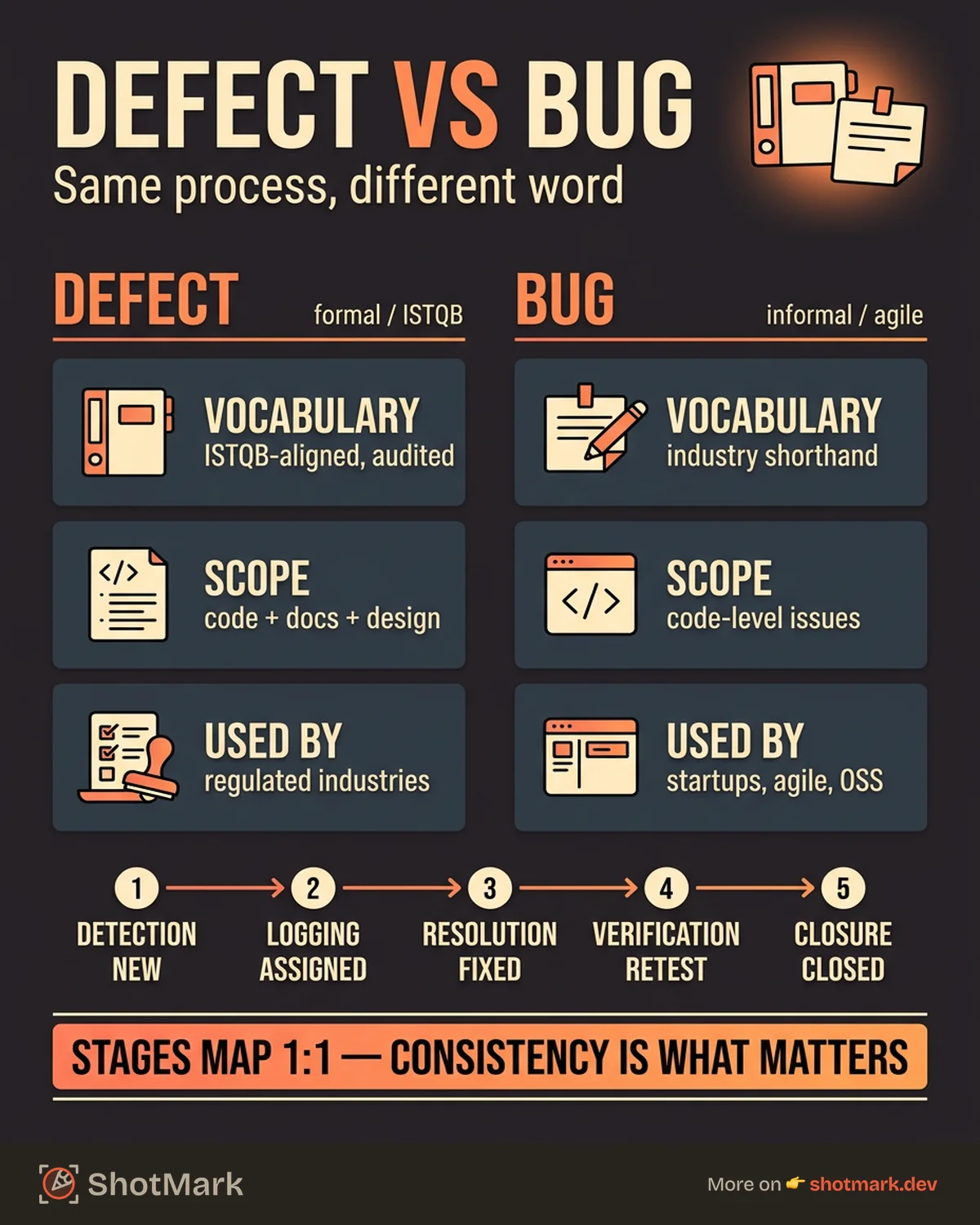
The practical difference between the defect life cycle and the bug life cycle at this level is essentially zero. The stages map one-to-one. Detection is New. Resolution is Fixed. Verification is Retested. The process is identical.
Where the Two Models Actually Differ
If the stages are the same, why do two terms exist? There are three areas where the distinction surfaces.
Terminology Precision
Formal testing frameworks (ISTQB, IEEE 829) draw careful lines between related terms:
- Error: A human mistake (the developer wrote
>instead of>=) - Defect (or fault): The flaw that exists in the code as a result of the error
- Failure: The observable incorrect behavior when the defect executes
Under this framework, “bug” is imprecise. It could refer to any of these three concepts. “Defect” refers specifically to the flaw in the work product. Teams preparing for ISTQB certification or writing formal test documentation need this precision.
In day-to-day engineering, nobody stops mid-standup to distinguish between an error, a defect, and a failure. “Bug” covers all three, and that is fine.
Scope of What Gets Tracked
Some frameworks treat “defect” as broader than “bug.” A defect can exist in a requirements document, a design specification, or a test case, not just in code. A bug, colloquially, almost always refers to a code-level issue.
This distinction matters for teams that track defects across the entire development lifecycle, not just during testing. If your process includes requirements reviews and design inspections, calling the tracked items “defects” is more accurate.
Status Names and Tool Configuration
Different tracking tools use different default labels for the same stages:
| Stage | Defect Life Cycle Term | Bug Life Cycle Term | Jira Default | Linear Default |
|---|---|---|---|---|
| Discovered | Detected | New | Open | Backlog |
| Assigned | Under Review | Assigned | In Progress | Todo |
| Being Fixed | In Resolution | Open/In Progress | In Progress | In Progress |
| Fix Complete | Resolved | Fixed | Resolved | Done |
| Verified | Verified | Retested | Closed | Done |
| Done | Closed | Closed | Closed | Done |
The labels change, but the workflow does not. BrowserStack’s bug lifecycle guide maps these stages to common tool configurations.
Which Term Should Your Team Use?
This decision is less important than most teams think. What matters is consistency, not the specific word.
Use “defect” if:
- Your organization follows ISTQB-aligned testing practices
- You work in a regulated industry that requires formal test documentation
- Your process tracks issues in requirements and design, not just code
- You are studying for or referencing ISTQB certification material
Use “bug” if:
- Your team runs agile sprints with informal communication
- You are a startup or small team where speed matters more than formality
- Your developers and QA engineers already say “bug” in conversation
- Your tracking tool (GitHub Issues, Linear) uses “bug” as the default label
Use both if:
- Your QA documentation says “defect” but your Slack channels say “bug”
- This is already how most teams operate, and it is perfectly fine
The real risk is not using the wrong word. It is using inconsistent status labels across your workflow. If your tracking tool says “Resolved,” your QA process says “Fixed,” and your Slack channel says “Done,” you will lose clarity about what stage a bug is actually in. Pick one set of labels and stick with it.
For teams building or refining their process, the defect management process guide covers how to design workflows that work regardless of which term you choose.
Applying Either Lifecycle to Your QA Workflow
Whichever term you use, the lifecycle only works if each stage has clear inputs, outputs, and ownership. Here is where most teams break down and how to fix it.
The Detection Stage Needs Context
The biggest bottleneck in any defect life cycle is not resolution. It is the gap between detection and logging. A tester finds a bug but logs it with insufficient detail. A developer picks it up three days later, cannot reproduce it, and sends it back. Two weeks pass before anyone looks at it again.
ShotMark captures the context that matters at the detection stage: screenshots, console logs, network requests, and environment data in one click. Whether you call it a defect or a bug, the information needed to fix it is the same. Visual evidence with technical context eliminates the back-and-forth that slows down every lifecycle stage after detection.
Status Workflows Need Enforcement
Map your lifecycle stages to your tracking tool’s status transitions and make them mandatory. Do not allow a bug to move from “Open” to “Closed” without passing through “Fixed” and “Retested.” This enforcement exists in Jira (workflow schemes), Linear (workflow states), and GitHub (project board automations).
For teams tracking defects across the full development lifecycle, the defect tracking guide covers how to set up tracking that spans from requirements review through production monitoring.
Training New Team Members
New QA engineers joining your team will bring their own vocabulary. Some learned “defect” in their certification courses. Others have only ever said “bug.” During onboarding, explicitly document which term your team uses, what each status label means, and who owns each lifecycle transition.
The defect life cycle and the bug life cycle describe the same process with different labels. The terminology distinction matters for formal testing frameworks and certification exams but rarely changes how your team actually works. What changes outcomes is having a well-defined lifecycle with clear ownership at each stage, consistent status labels in your tools, and enough context at the detection stage to keep bugs moving toward closure.
Get new posts in your inbox.
One email when we publish: notes on QA, AI, and shipping faster. No spam, unsubscribe anytime.