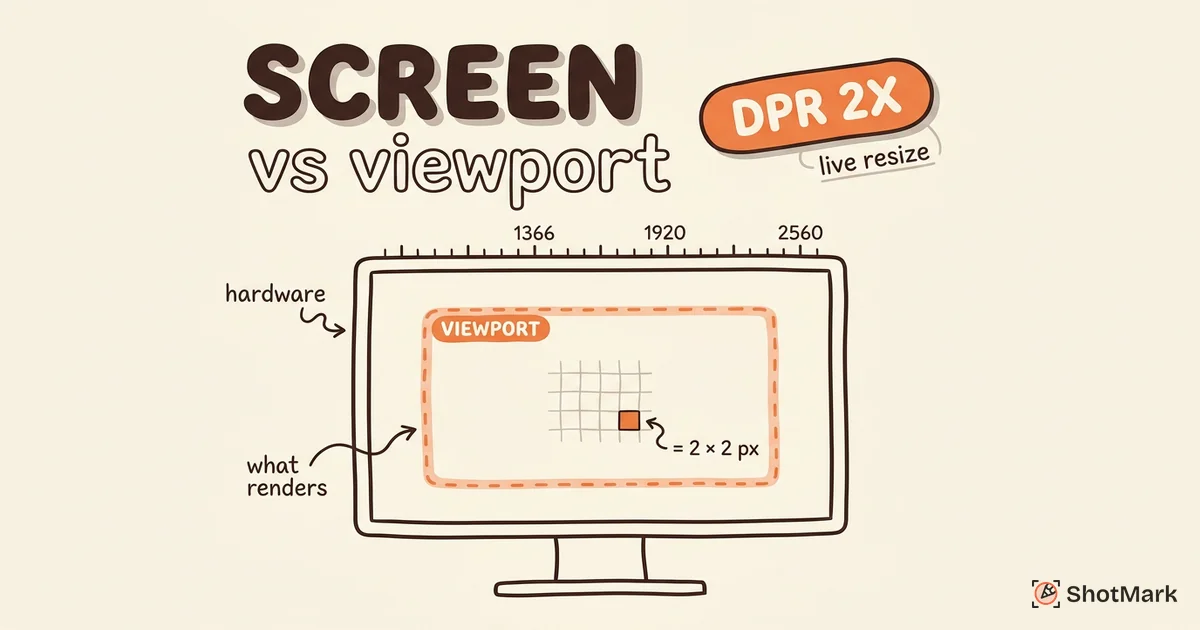
The tool above detects your screen resolution the moment the page loads. It shows your display resolution, viewport size, device pixel ratio, aspect ratio, color depth, and screen orientation all at once. If you resize your browser window, the viewport dimensions update in real time so you can see how content area changes at different widths.
Below the detection panel there is a Copy All button. Click it to copy a formatted summary of your display information, ready to paste into a support ticket, bug report, or design specification.
Screen Resolution vs Viewport Size
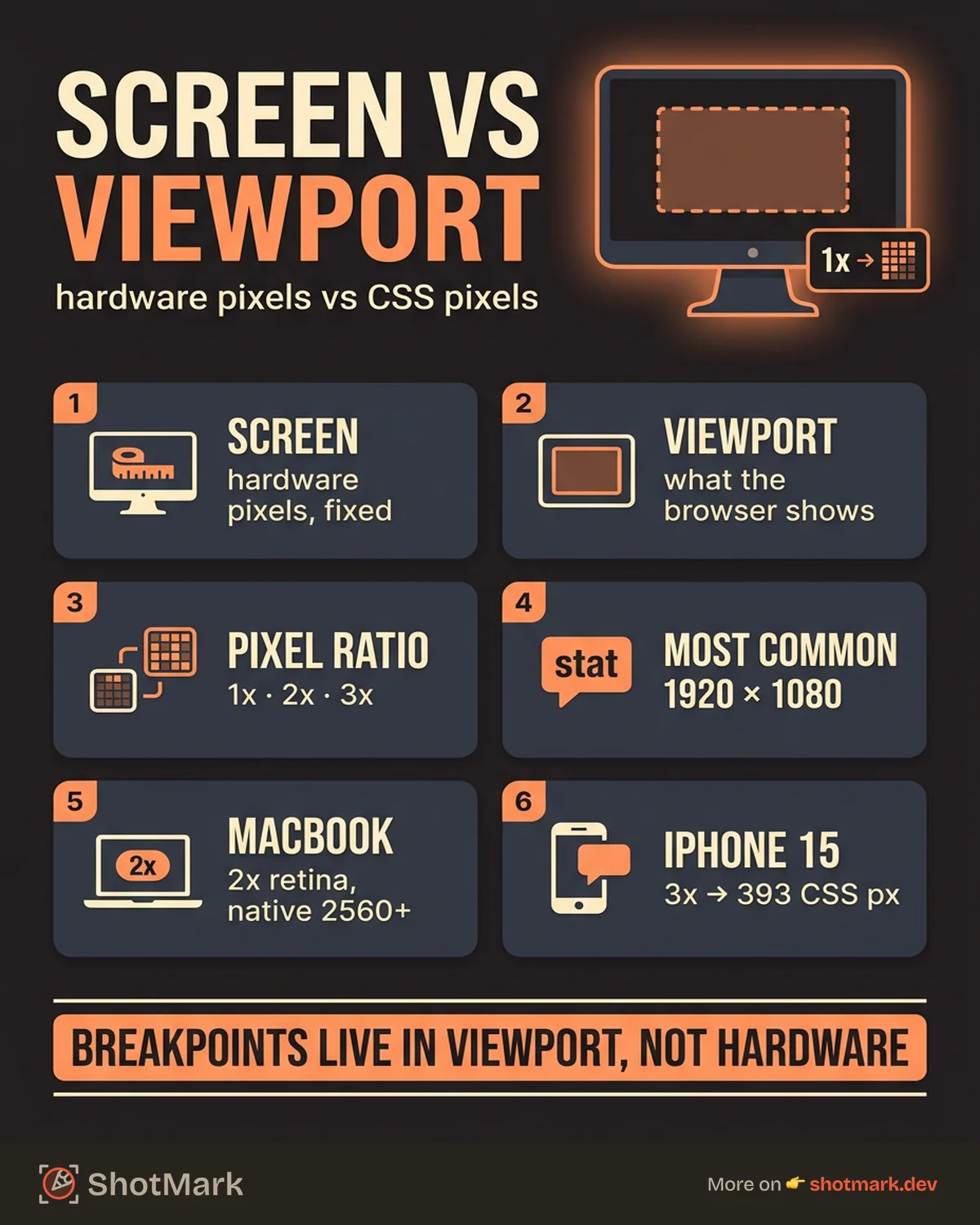
These two numbers are related but measure different things. Screen resolution is the total number of pixels your physical display can show. It is a hardware property. A 1920x1080 monitor always has 1,920 pixels across and 1,080 pixels tall, regardless of what browser or application is open.
Viewport size is the area inside your browser window where web content actually renders. It is always smaller than (or equal to) your screen resolution because the browser chrome, operating system taskbar, and any side panels take up space. When developers talk about responsive breakpoints (768px for tablets, 1024px for small laptops), they are referring to viewport width, not screen resolution.
Device pixel ratio ties the two together. It tells you how many physical pixels map to one CSS pixel. A standard display has a ratio of 1. A MacBook Retina display has a ratio of 2, meaning one CSS pixel uses a 2x2 grid of physical pixels. Text and images appear sharper because there is more hardware detail behind each point on screen.
This distinction matters because responsive design breakpoints are based on viewport width, not your screen resolution. A page that looks fine at a viewport of 1440px might break at 1024px even though your physical monitor has not changed. If you are filing a layout bug, the viewport size is what developers need to see. Our post on responsive design testing across every device size covers this in more depth.
How to Use This Tool
The process takes four steps.
- Open this page. The tool detects your display and viewport info on load.
- Review the numbers in the detection panel above. Resize your browser window to see the viewport dimensions update live.
- Click the Copy All button to copy a formatted summary to your clipboard.
- Paste the copied text into your ticket, report, or specification document.
Everything runs in your browser using the Screen API . No data is sent to any server.
Common Use Cases
Bug Reporting
Screen resolution and viewport size directly affect how websites render. A layout that looks correct on a 1920x1080 display might overlap or clip on a 1366x768 screen. A fixed-width element that fits comfortably at one viewport size could cause horizontal scrolling at a narrower width.
Including your display information in a bug report means the developer can set their browser to the same viewport size and reproduce the issue immediately. Without it, they are guessing at your environment. For more on what makes an effective report, see our guide on how to write bug reports developers actually fix.
ShotMark captures viewport size, screen resolution, device pixel ratio, and browser details automatically with every bug report. No manual steps required.
Design and Development
Designers and frontend developers use display information constantly. If you are building a responsive layout, you need to verify that your design holds up at common breakpoints. Resizing your browser and watching the viewport dimensions update in the tool above is faster than opening DevTools every time.
Device pixel ratio is especially important for image and font rendering. A 2x display serves higher-resolution images from srcset attributes, while a 1x display gets the standard version. Testing at the wrong pixel ratio can lead to blurry assets in production.
Purchasing Decisions
Comparing your current display to a new monitor is easier when you know your exact resolution. If you are upgrading from a 1366x768 laptop screen to a 2560x1440 external monitor, the difference in workspace is significant. Checking your current numbers before you shop helps you understand the jump you are making.
Common Screen Resolutions
The table below shows the most widely used screen resolutions. According to StatCounter , 1920x1080 remains the most popular desktop resolution worldwide.
| Resolution | Label | Common Devices |
|---|---|---|
| 1366x768 | HD | Budget laptops, older displays |
| 1920x1080 | Full HD | Standard monitors, most laptops |
| 2560x1440 | QHD | Professional monitors, 27-inch displays |
| 3840x2160 | 4K UHD | High-end monitors, TVs |
Apple laptops use non-standard resolutions that pair high pixel counts with 2x device pixel ratios.
| Device | Native Resolution | Pixel Ratio |
|---|---|---|
| MacBook Pro 14” | 2560x1600 | 2x |
| MacBook Pro 16” | 2880x1800 | 2x |
| MacBook Air 13” | 2560x1600 | 2x |
Mobile screens vary widely. These are three of the most common.
| Device | Resolution | Pixel Ratio |
|---|---|---|
| iPhone 15 | 1179x2556 | 3x |
| Google Pixel 8 | 1080x2400 | 2.6x |
| Samsung Galaxy S24 | 1080x2340 | 3x |
When testing mobile layouts, the viewport width after the pixel ratio is applied is what matters. An iPhone 15 at 3x has a CSS viewport width of roughly 393px, not 1179px. Our browser checker tool detects your user agent and device type, which pairs well with this resolution data when you are debugging mobile issues.
For more developer tools that run entirely in your browser, our free Base64 encoder and decoder handles encoding tasks without sending data to any server.
FAQ
What is my screen resolution?
The detection panel at the top of this page shows your screen resolution automatically. Scroll up to see it.
What is the difference between screen resolution and viewport size?
Screen resolution is the total pixel count of your physical display. Viewport size is the area inside your browser window where content renders. Viewport is always equal to or smaller than screen resolution.
What is device pixel ratio?
Device pixel ratio (DPR) is the number of physical pixels used to display one CSS pixel. A DPR of 2 means each CSS pixel is rendered as a 2x2 grid of physical pixels, producing sharper text and images on high-density displays like Retina screens.
Is this tool free?
Yes. No account, no sign-up, no usage limits. All detection happens in your browser.
Does this work on mobile?
Yes. The tool detects screen resolution and viewport on phones and tablets. Open this page in any mobile browser to see your display details.
Why does screen resolution matter for bug reports?
Layout bugs often depend on viewport width. A developer who does not know your screen resolution or viewport size cannot reproduce the exact rendering you experienced. Including display data in your report narrows down the problem and speeds up the fix. Our post on browser compatibility testing for modern web apps explains how display differences contribute to cross-browser issues.
Stop asking testers for their screen resolution. ShotMark captures display info, viewport size, browser, and OS automatically with every bug report. Join the waitlist
Get new posts in your inbox.
One email when we publish: notes on QA, AI, and shipping faster. No spam, unsubscribe anytime.