Two-week sprints leave zero room for waterfall-style testing. If development takes 8 days and QA starts on day 9, you have two days to test everything, find bugs, fix them, and retest. That math does not work. Sprint testing requires a different approach, one where testing happens continuously throughout the sprint, not at the end.
This guide breaks down a day-by-day sprint testing timeline, explains why most teams fall into the “Sprint+1” trap, and shares five tactics that let QA keep pace with development. The goal is a process where every story planned in a sprint actually ships tested and verified within the same sprint.
Why Sprint Testing Fails (The “Sprint+1” Problem)
Most agile teams already know testing should happen inside the sprint. Yet a surprising number of teams end up in what we call the “Sprint+1” pattern: QA tests stories from the previous sprint while developers build stories for the current one.
On paper, it looks efficient. In practice, it creates a permanent one-sprint delay between code and verification. Bugs found in sprint N+1 get deprioritized because the team has already committed to new work. Developers also lose context on the code they wrote two weeks ago, so even simple fixes take longer than they should.
The deeper issue is that Sprint+1 hides process problems. Velocity looks stable, tickets move across the board, and everyone feels busy. Meanwhile, the definition of done quietly erodes. A story marked “done” in sprint N is really “developed but not yet tested,” which is not the same thing. Before we fix the timeline, we have to name the failure mode. For a broader view of how QA fits into agile ceremonies, see our QA workflow from bug discovery to resolution guide.
A Day-by-Day Sprint Testing Timeline
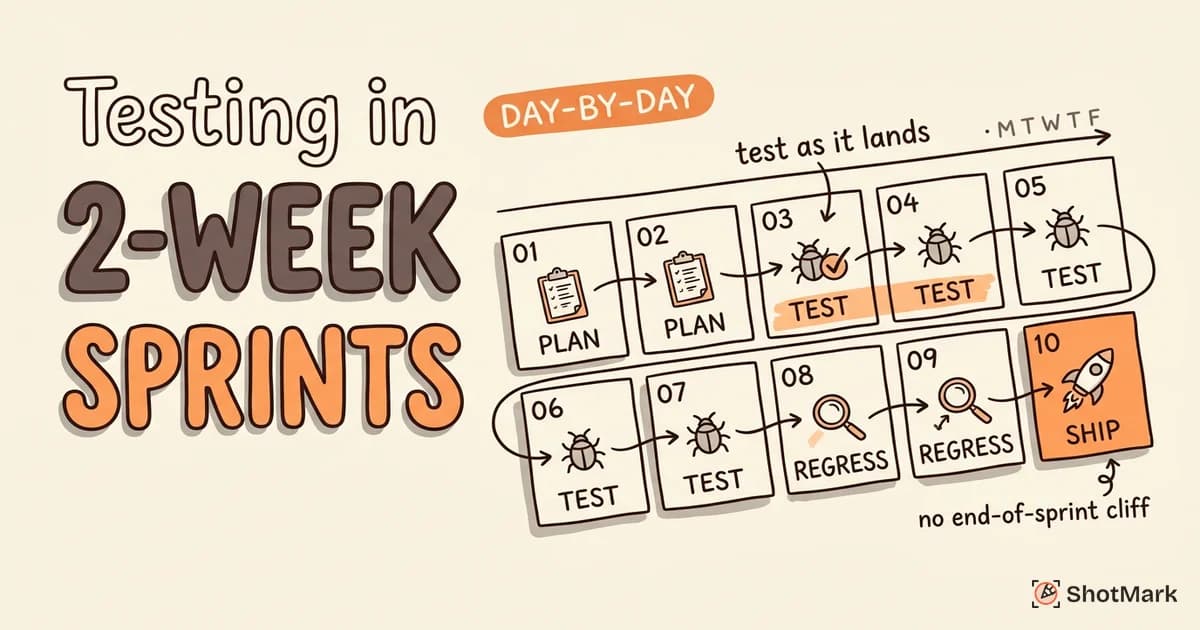
Here is what a healthy 2-week sprint looks like when testing runs in parallel with development. The timeline assumes a Monday-to-Friday schedule with sprint planning on day 1 and release on day 10.
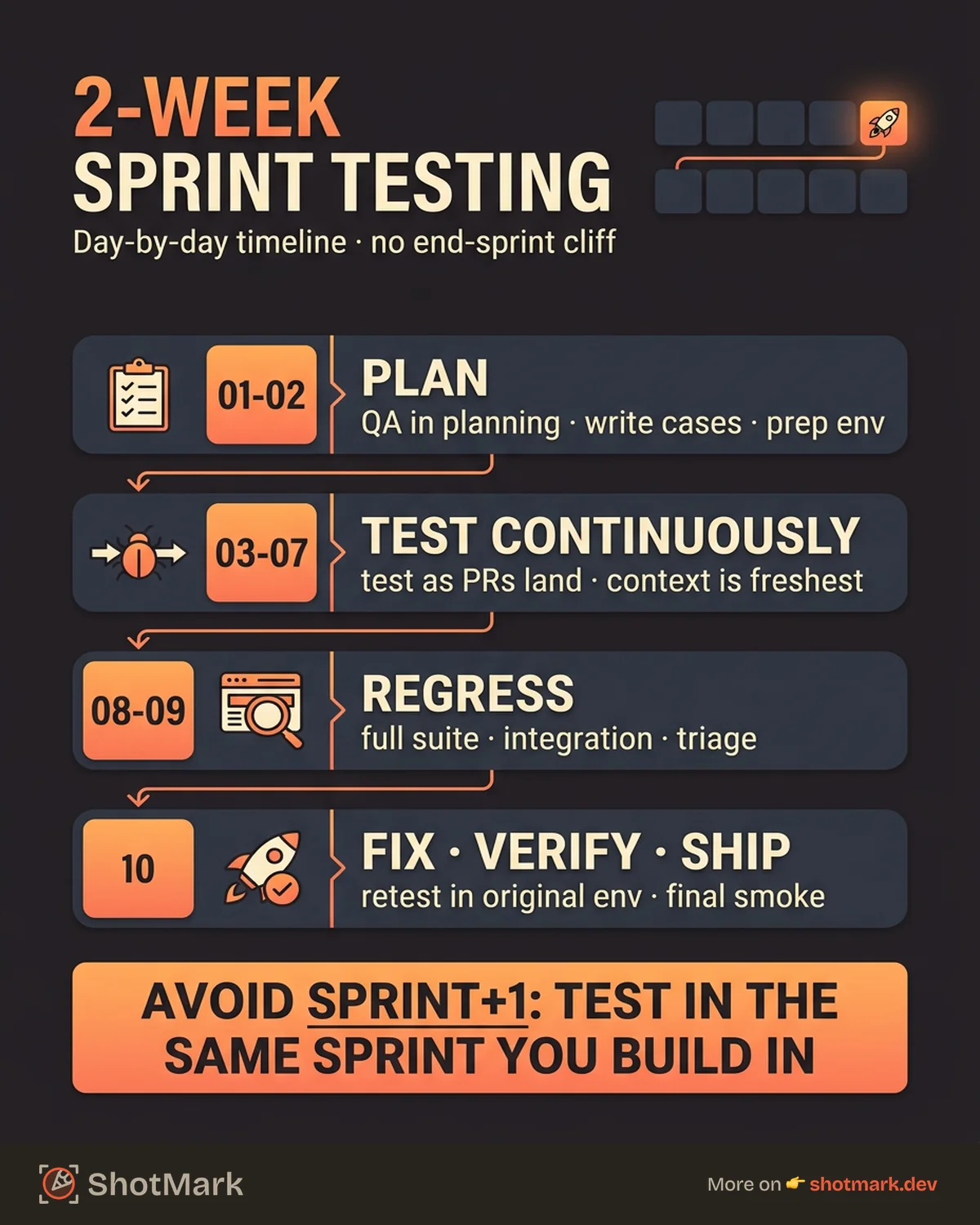
Days 1-2: Sprint Planning and Test Preparation
Sprint planning is not a developer-only ceremony. QA sits in planning to ask clarifying questions on acceptance criteria, spot ambiguous requirements, and estimate test effort alongside development estimates. This is the first chance to prevent bugs, not find them.
During these first two days, QA engineers review each user story, write test cases against acceptance criteria, and identify candidates for automation. The official Scrum Guide describes sprint planning as the moment when the team forges a shared plan, and test preparation is part of that plan.
Test data and environments also get set up now. If a story needs a specific user role, a seeded database, or a feature flag, waiting until day 7 to set that up means losing a day of testing later.
Days 3-7: Continuous Testing (Mid-Sprint)
Mid-sprint is where sprint testing either works or falls apart. The rule is simple: test features as developers complete them, not after all features are done.
When a developer marks a ticket “ready for QA” on day 4, testing starts on day 4. That means QA runs smoke tests on daily builds, verifies small features quickly, and files bugs the moment they appear. Context is freshest right after code lands, so bug reports written during this window get resolved faster than anything written a week later.
Fast bug reporting matters here. If filing a single bug takes 10 minutes of screenshotting, annotating, and copying console output, testers lose flow. ShotMark handles this with one-click capture of screenshots, console logs, network requests, and session replay, so testers stay focused on finding issues instead of documenting them.
Days 8-9: Regression and Integration Testing
By day 8, most new features should be tested individually. Now the question shifts from “does this story work?” to “does the whole product still work?”
Run the full regression suite, a mix of automated checks and manual critical path tests. Integration testing covers features that interact with each other. Cross-browser and device spot checks catch issues that a single-environment test misses. If the sprint includes performance-sensitive changes, add a quick performance smoke check here too.
Days 8-9 are also when you triage any remaining bugs. Not every bug gets fixed inside the sprint. Critical and high-severity issues block release. Medium and low issues get tracked for the next sprint or the backlog.
Day 10: Bug Fixes, Retesting, and Release
Day 10 is short and focused. Developers fix the critical and high bugs found during regression. QA retests each fix in the exact environment where the bug was found. Fixes that ship without verification are the number one source of “regression bugs” that reappear in later sprints.
A final smoke test runs on the release candidate. If everything passes, the release ships. If something fails, the team decides between a same-day hotfix, a scope cut, or rolling the work into the next sprint. The decision is explicit, not accidental.
This cadence also leaves room for sprint review and retrospective. Teams that skip the retro to cram in more testing usually repeat the same mistakes next sprint. Protecting the retro is one of the most valuable habits a testing team can build.
5 Tactics for Testing in Short Sprints
A timeline is only a scaffold. These five tactics are what make the timeline actually hold up under pressure.
1. Stagger Development and Testing
Ask developers to order their work by priority, not preference. The highest-priority story gets built first and handed to QA first. Development keeps moving on story two while QA tests story one.
Staggering works because it turns a sequential handoff into a pipeline. QA never waits for “everything to be done,” and developers never wait for “all the bugs to come back at once.”
2. Automate Regression, Not New Features
Automate the stuff that does not change. Regression tests for stable features are the highest-value automation targets because they run every sprint and catch drift.
New feature tests stay manual and exploratory for the first sprint or two. Exploratory testing finds the weird edge cases that scripted tests miss. Once a feature is stable, promote the important test cases into the automated regression suite. Lisa Crispin and Janet Gregory’s work on agile testing quadrants describes this split well: automate what is repetitive, keep humans on what is novel.
3. Use Risk-Based Testing
Not every line of code needs the same level of testing every sprint. Risk-based testing focuses effort on changed code, high-traffic user flows, and features with a history of regressions.
Ask two questions for every story: what happens if this breaks, and how likely is it to break? A checkout flow scores high on both. A cosmetic footer update scores low. Test them accordingly.
4. Pair Testing
Pair a developer and a QA engineer on complex features for 30 to 60 minutes. The developer knows what they built. The tester knows what could go wrong. Together, they find issues faster than either would alone.
The format also reduces the number of “that’s not a bug, that’s expected behavior” tickets, because the pair discusses intent in real time. For features that touch multiple systems, a quick pairing session at the start of testing often saves hours of back-and-forth later. Try it first on the story that scares the team the most during planning. That is usually the story that needs it.
5. Keep Bug Reports Fast and Contextual
Every minute spent writing a bug report is a minute not spent testing. The fastest bug reports are visual and contextual: screenshot, annotation, console log, network request, environment info, all attached automatically.
This is where tooling pays off. Manual bug writing can take 10 minutes per issue. Automated visual capture takes 30 seconds. Over a 2-week sprint with 40 bugs, that is a full day of testing reclaimed. For a deeper breakdown, see our guide on how to write better bug reports.
Sprint Testing Metrics That Actually Matter
Tracking the right numbers is how you know sprint testing is working. Vanity metrics like “bugs filed” say nothing about quality. These five metrics do.
- Stories tested vs stories planned: If this is not near 100%, testing is slipping out of the sprint.
- Bug find rate during sprint vs after release: Bugs found in sprint are cheap. Bugs found after release are expensive.
- Regression test pass rate: A falling pass rate signals that automation is going stale or that core flows are being broken.
- Average time from bug report to fix: If the average creeps above 2 days, the pipeline is clogged.
- Sprint velocity impact from QA bottlenecks: Compare planned to completed points across sprints to spot recurring testing bottlenecks.
Report these in the retro, not just the sprint review. Retros are where process changes actually get agreed on. The State of Agile report consistently shows that teams tracking quality metrics alongside velocity outperform teams tracking velocity alone.
Adjusting for 1-Week and 3-Week Sprints
The 2-week cadence is a starting point, not a law. Shorter and longer sprints each change the testing math.
How do you fit testing into 1-week sprints?
One-week sprints punish any manual bottleneck. The only way to make them work is heavy automation of regression plus very small story sizes. Stories larger than 2 story points usually cannot be developed and tested in the same week. Exploratory testing windows shrink to hours, not days, so preparation during planning becomes even more important.
How do you scale sprint testing to 3-week sprints?
Three-week sprints give more room for thorough testing but invite scope creep. The risk is that a third week feels “free” and teams add stories late in planning. Hold the line on scope. Use the extra time for deeper exploratory testing, cross-browser coverage, and performance work that a 2-week cycle would defer.
Whatever the sprint length, the principle is identical: testing happens continuously, in parallel with development, and the definition of done includes verification.
Start Your Next Sprint With a Better Testing Rhythm
Good sprint testing is less about heroics and more about rhythm. Stagger the work, test continuously, automate the repetitive checks, and keep bug reports short and context-rich. Teams that do this ship cleaner releases without extending the sprint or adding headcount.
ShotMark is built to remove the slowest part of that rhythm. One-click capture of screenshots, console logs, network requests, and session replay means QA and developers spend time on the actual work of sprint testing, not on paperwork. The open-source SDK is on the way, and the waitlist is open if you want early access.
Get new posts in your inbox.
One email when we publish: notes on QA, AI, and shipping faster. No spam, unsubscribe anytime.