Frontend testing tools have multiplied over the past few years, but most teams still aren’t sure which tool belongs at which layer. The result is predictable: gaps in coverage at the bottom of the stack and slow, flaky tests at the top. A clear mapping of tools to testing layers fixes both problems.
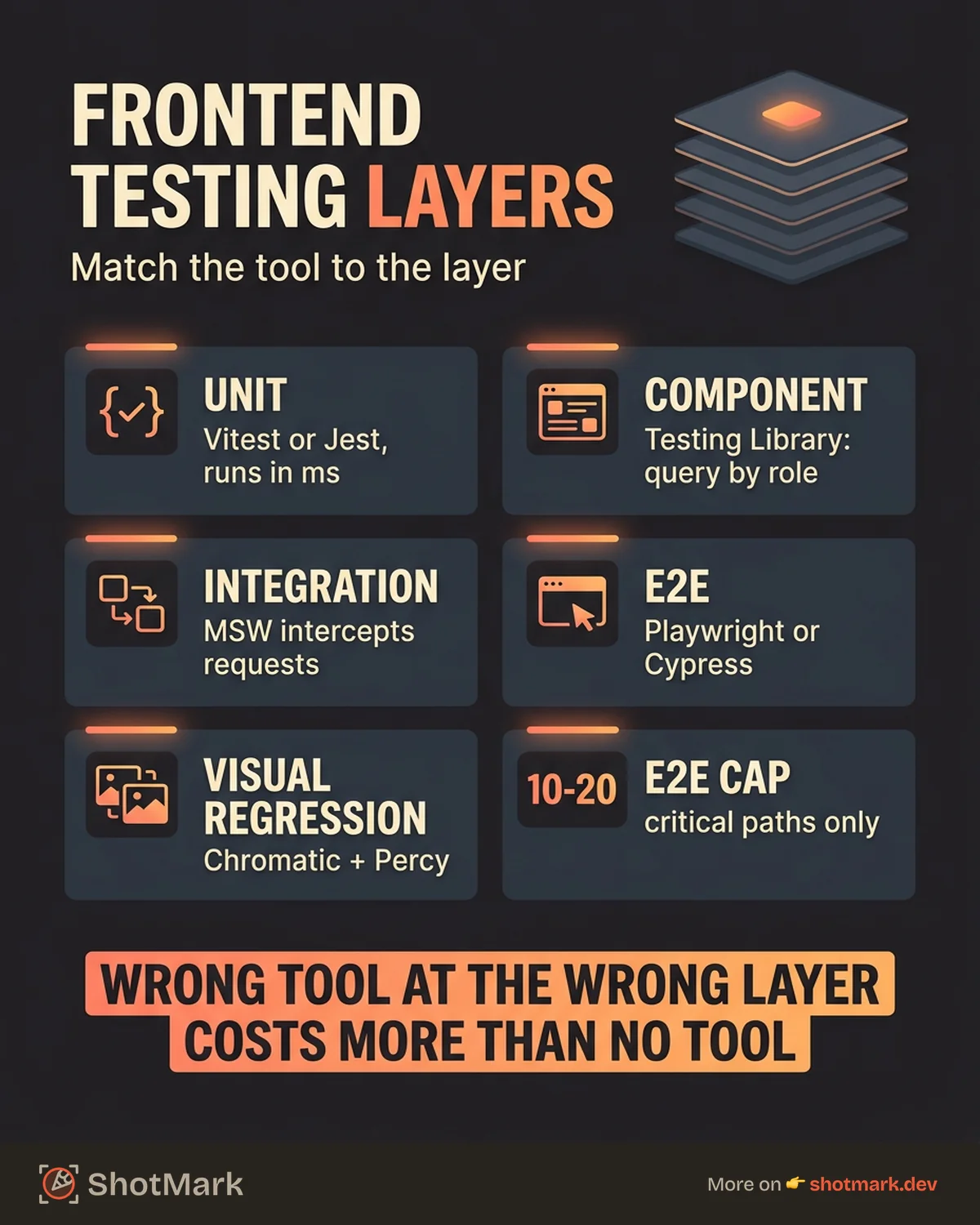
The right tool at the wrong layer causes more harm than good. Unit testing tools used for E2E flows create brittle, slow suites. E2E tools used for unit-level checks add unnecessary complexity. Getting the mapping right is the difference between a testing strategy that accelerates shipping and one that drags it down.
The Frontend Testing Pyramid
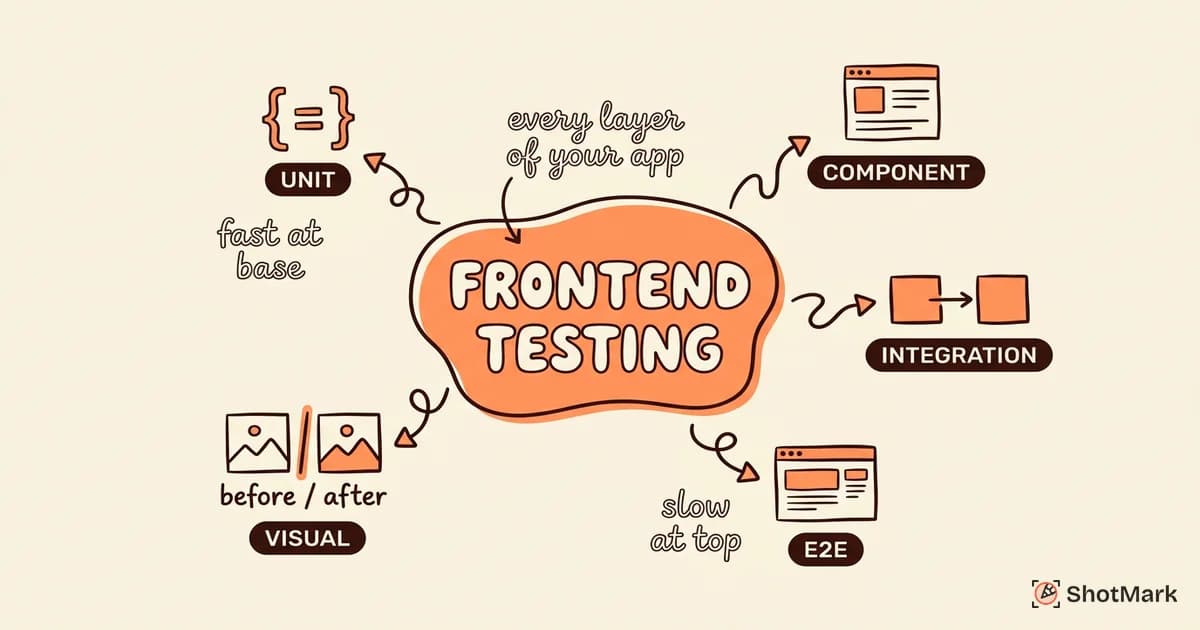
Kent C. Dodds popularized the testing trophy concept, and it maps well to frontend testing. The structure looks like this:
- Unit tests at the base: fast, isolated, test individual functions and hooks
- Component tests in the middle: render components, verify behavior and output
- Integration tests: test how components work together with state and APIs
- E2E tests at the top: simulate real user flows in a browser
- Visual regression tests as a parallel layer: catch unintended UI changes across any tier
The pyramid shape matters. You should have more unit tests than component tests, more component tests than integration tests, and the fewest tests at the E2E level. Unit tests run in milliseconds. E2E tests take seconds or minutes. The higher up the pyramid, the more expensive each test becomes to write, run, and maintain.
Unit Testing Tools for Frontend
Frontend unit testing covers utility functions, custom hooks, state logic, and data transformations. These are the cheapest tests to write and run.
Vitest
Vitest is fast, Vite-native, and ESM-first. It shares your Vite configuration, which means zero additional setup for most projects. The watch mode is responsive, and the API is compatible with Jest for easy migration.
Vitest has been growing rapidly and is the default choice for new Vite projects. If your build tool is Vite, Vitest is the natural fit.
Jest
Jest has the most mature ecosystem and widest adoption. The plugin library is enormous, and most tutorials assume Jest as the default.
The tradeoff: Jest is slower on large codebases, especially those using ESM. Configuration for Vite or modern bundlers requires extra setup that Vitest handles natively.
When to use which: Vitest for Vite projects. Jest for legacy codebases or projects using Webpack without plans to migrate.
What to Unit Test
- Pure utility functions (formatting, validation, calculations)
- Custom React hooks (state transitions, side effects)
- State management logic (reducers, selectors)
- Data transformation functions (API response mappers, serializers)
Anti-pattern to avoid: Unit testing DOM output. If you’re asserting that a component renders a specific class name or HTML structure, that belongs in a component test.
Component and Integration Testing Tools
Component tests verify that individual components render correctly and respond to user interaction. Integration tests check that components work together with state management and API calls.
React Testing Library / Vue Testing Library
React Testing Library and its Vue counterpart follow a guiding principle: test behavior, not implementation details . Instead of checking component state or method calls, you query the DOM the way a user would (by text, role, label) and assert on what they’d see.
This approach produces tests that survive refactors. When you rename an internal variable or restructure a component’s state, behavior-focused tests keep passing. Implementation-focused tests break.
Storybook and Test Runner
Storybook serves double duty: visual development environment and automated testing platform. Write stories for each component state, then use the Storybook test runner to execute interaction tests against those stories.
This works particularly well for design systems and component libraries where you need to verify every variant and state combination.
MSW for API Mocking
MSW (Mock Service Worker) intercepts network requests at the service worker level. Your tests interact with what looks like a real API, but responses come from your mock definitions.
This is the cleanest approach to integration testing because your components don’t know they’re being tested. No mocked fetch calls in your source code. No test-specific API wrappers.
What to cover at this layer: form submissions, conditional rendering, error states, loading states, data fetching with loading/error/success flows.
E2E Testing Tools for Frontend
Frontend E2E testing tools simulate real user behavior in a browser. These tests verify critical user journeys end to end.
Playwright
Playwright supports Chromium, Firefox, and WebKit with a single API. Built-in auto-waiting handles most timing issues that plague other frameworks. The trace viewer records DOM snapshots, network activity, and console output for every test.
Microsoft backs Playwright, and the ecosystem is growing fast.
Cypress
Cypress runs inside the browser, which gives it fast execution and the best debugging UI in the business. Time-travel snapshots let you inspect the DOM at any point during the test.
The limitation: Cypress operates in a single tab and doesn’t support WebKit-based browsers. For most web applications, that’s fine. For full cross-browser coverage, Playwright has the edge.
| Feature | Playwright | Cypress |
|---|---|---|
| Browser support | Chromium, Firefox, WebKit | Chromium, Firefox |
| Execution speed | Fast | Fast |
| Debugging UI | Trace viewer | Time-travel (better) |
| Multi-tab support | Yes | No |
| CI integration | Excellent | Good |
| Learning curve | Moderate | Low |
What to E2E test: critical user journeys only. Signup flows, checkout processes, core workflows. Keep E2E suites focused on 10 to 20 critical paths. Hundreds of E2E scenarios become a maintenance burden that slows your pipeline.
Visual Regression Testing Tools
Visual regression testing catches unintended UI changes by comparing screenshots. It runs as a parallel layer across the pyramid.
Chromatic
Chromatic integrates directly with Storybook. It captures visual snapshots of every story and highlights pixel-level differences between runs. This is the strongest option for component-level visual testing.
Percy
Percy from BrowserStack takes page-level visual snapshots. It handles responsive testing across viewports and integrates with most CI platforms. Better suited for full-page comparisons than individual components.
Playwright Visual Comparisons
Playwright includes built-in screenshot diffing. No extra tool required if you’re already using Playwright for E2E tests.
// Built-in visual comparison in Playwright
await expect(page).toHaveScreenshot('homepage.png', {
  maxDiffPixelRatio: 0.01,
});
When visual regression matters most: design systems, component libraries, marketing pages, and any UI where visual consistency is a product requirement.
Handle false positives by tuning diff thresholds and masking dynamic content (timestamps, user-specific data, ads) that changes between runs.
Connecting Test Failures to Action
Test failures only create value when they lead to fixes. A failing test without context generates a Slack message, a Jira ticket with no details, and a 20-minute debugging session.
The best test reports include the browser, viewport, application state, and what happened. Screenshots from failed E2E runs help, but they’re incomplete without console errors and network responses. That’s the gap between “the cart button stopped working” and “the cart button returns a 500 error because the session token expired.”
ShotMark captures the full debugging context when tests fail or users report visual bugs. Screenshots, console logs, network requests, and DOM state in one report. Developers get the complete picture without asking for reproduction steps or environment details.
Frontend testing tools work best when each layer has the right tool for the job. The pyramid isn’t a rigid framework, it’s a guide. Start with strong unit and component coverage, add E2E tests for critical paths, and use visual regression where pixel-perfect output matters.
Get new posts in your inbox.
One email when we publish: notes on QA, AI, and shipping faster. No spam, unsubscribe anytime.