Continuous testing means every code change is automatically validated before it reaches users. But most teams implement it poorly. They run too few tests and miss bugs, or they run too many and wait 45 minutes for a build to finish. The key is running the right tests at the right stage of your pipeline.
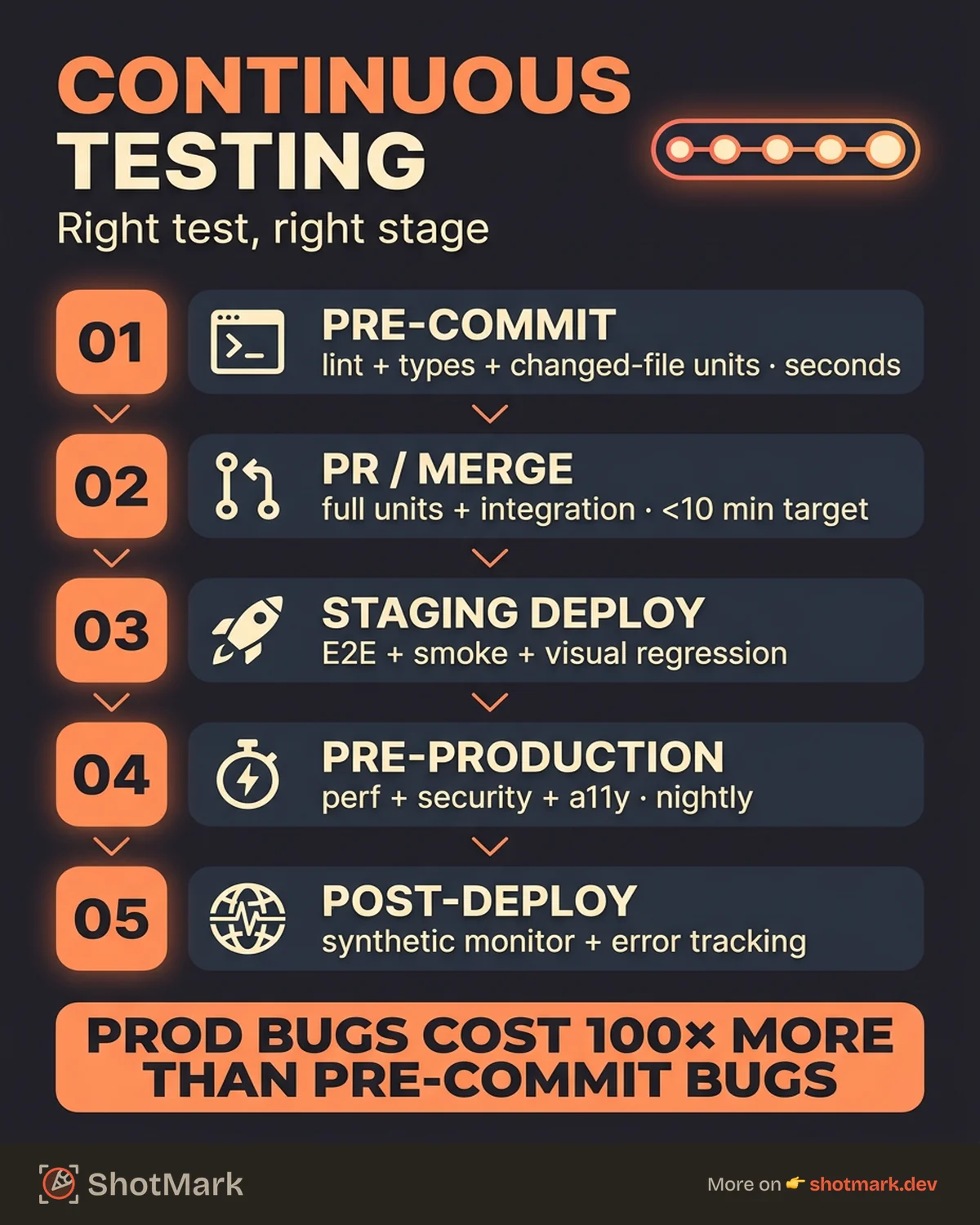
Getting this wrong is expensive. Bugs caught in production cost 10 to 100 times more to fix than bugs caught during development. The GitHub State of the Octoverse report shows that teams with mature CI/CD practices deploy more frequently, with fewer incidents, and recover faster when something breaks. Continuous testing is the practice that makes that possible.
What Is Continuous Testing
Continuous testing is automated testing executed at every stage of the software delivery pipeline. It is not the same as having tests that run in CI.
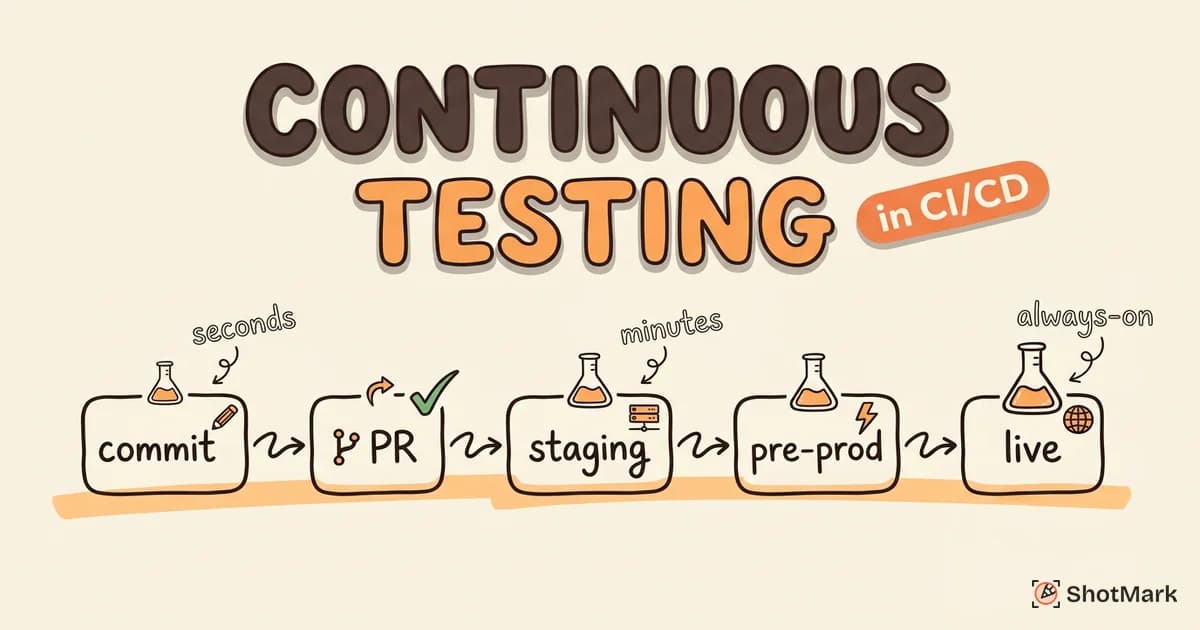
Continuous integration (CI) ensures code from multiple developers merges reliably. Continuous delivery (CD) ensures that merged code can be deployed safely. Continuous testing is the layer that validates correctness at each step: pre-commit, on merge, during staging, and after deployment. It combines shift-left testing principles with automation and fast feedback loops, an approach covered in more detail in our guide on shift-left testing for QA teams.
“Adding tests to CI” is not continuous testing. Running a full E2E suite on every commit is also not continuous testing. It is a strategy problem, not a tooling one. The right test runs at the right time, and the wrong test gets out of the way.
The Testing Pyramid in CI/CD
The testing pyramid, popularized by Martin Fowler , maps directly to pipeline stages. The idea is simple: many fast tests at the bottom, fewer slow tests at the top.
- Unit tests run on every commit and finish in seconds. They test individual functions and modules in isolation.
- Integration tests run on PR merge and take minutes. They test how modules interact with databases, APIs, and external services.
- E2E tests run on staging deploys and take minutes to hours. They test full user workflows through the actual interface.
- Visual and snapshot tests run on PRs to catch unintended UI changes.
- Performance tests run pre-release to catch regressions in load times and throughput.
The mistake most teams make is inverting the pyramid: a handful of unit tests and hundreds of E2E tests. That makes the pipeline slow and flaky. The fix is investing in fast, reliable unit tests that cover edge cases, and reserving E2E tests for critical user paths only.
Setting Up Continuous Testing Stage by Stage
Stage 1: Pre-Commit (Developer Machine)
Catch problems before they reach the shared repository. Pre-commit hooks using Husky or lint-staged run checks locally in seconds.
- Linting and type checking (ESLint, TypeScript compiler)
- Code formatting (Prettier)
- Unit tests for changed files only
This stage catches trivial issues (formatting, type errors) that waste CI minutes if they slip through. It is optional in the sense that the pipeline catches them anyway, but it saves developer time and reduces CI queue congestion.
Stage 2: PR and Merge Request
This is the main quality gate. Every pull request runs through a full validation suite before it can be merged.
- Full unit test suite
- Integration tests for affected modules
- Static analysis (SonarQube, CodeClimate)
- Build verification (does the app compile and start?)
- Visual and snapshot tests for changed components
PR pipelines should finish in under 10 minutes. If they take longer, developers start merging without waiting for results, which defeats the purpose. Our guide on building a QA process from scratch covers how to define these quality gates for your team.
Stage 3: Staging Deploy
Once code merges to the main branch and deploys to a staging environment, run heavier tests that require a running application.
- E2E tests against the staging environment (Playwright, Cypress)
- Smoke tests for critical paths (login, checkout, core flows)
- Visual regression tests (Chromatic, Percy)
- API contract tests to verify backward compatibility
Not every PR needs E2E tests. Run them on merge to main, or on a schedule, to keep PR pipelines fast.
Stage 4: Pre-Production
Before releasing to production, run tests that are too slow or too expensive for every PR.
- Performance and load tests (k6, Lighthouse CI)
- Security scans (Snyk, OWASP ZAP)
- Accessibility checks (axe-core)
These run nightly or on a release candidate branch, not on every commit.
Stage 5: Post-Deploy (Production)
Testing does not stop at deployment. Production monitoring catches issues that pre-production tests miss.
- Synthetic monitoring (Datadog, Checkly) for uptime and performance
- Error monitoring (Sentry) for runtime exceptions
- Session replay for understanding real-user issues
- Console and network capture for debugging production bugs with full context
CI/CD Testing Pipeline Example
Here is a GitHub Actions workflow that maps the testing stages to specific jobs. The structure applies to any CI platform.
name: CI Pipeline

on: [push, pull_request]

jobs:
  unit-tests:
    runs-on: ubuntu-latest
    steps:
      - uses: actions/checkout@v4
      - uses: actions/setup-node@v4
        with:
          node-version: 20
      - run: npm ci
      - run: npm run test:unit
      - run: npm run lint
      - run: npm run typecheck

  integration-tests:
    needs: unit-tests
    runs-on: ubuntu-latest
    steps:
      - uses: actions/checkout@v4
      - run: npm ci
      - run: npm run test:integration

  e2e-tests:
    needs: integration-tests
    runs-on: ubuntu-latest
    if: github.ref == 'refs/heads/main'
    steps:
      - uses: actions/checkout@v4
      - run: npm ci
      - run: npx playwright install
      - run: npm run test:e2e

  deploy-staging:
    needs: e2e-tests
    runs-on: ubuntu-latest
    if: github.ref == 'refs/heads/main'
    steps:
      - run: echo "Deploy to staging"
Notice that E2E tests only run on the main branch. Unit and integration tests run on every push and PR. This keeps the PR pipeline under 10 minutes while still catching regressions before they reach staging.
For parallelization, split your test suite across multiple workers. Most CI platforms support matrix builds or parallel jobs. A test suite that takes 20 minutes on a single runner can finish in 4 minutes across five parallel runners.
Tools for Continuous Testing
| Stage | Tool Options |
|---|---|
| Unit/Integration | Jest, Vitest, pytest, Go test |
| E2E | Playwright, Cypress, TestCafe |
| Visual regression | Chromatic, Percy, BackstopJS |
| Performance | k6, Lighthouse CI, Artillery |
| Security | Snyk, OWASP ZAP, Trivy |
| Monitoring | Sentry, ShotMark, Datadog |
The best tool is the one your team will actually use. A fast, reliable test suite in Jest is worth more than a comprehensive Playwright suite that nobody maintains.
Keeping Pipelines Fast
Slow pipelines kill continuous testing. When developers wait 30 minutes for a build, they stop running tests locally, stop reading test output, and start ignoring failures. Speed is not a nice-to-have. It is a requirement.
- Parallelize test suites across workers. Most CI platforms support this natively.
- Cache dependencies and build artifacts so you are not reinstalling packages on every run.
- Run only affected tests on PRs using test impact analysis. If you changed the auth module, you do not need to run the billing tests.
- Separate fast tests from slow tests: Fast tests block the merge. Slow tests run in parallel and report results asynchronously.
- Set time budgets: PR pipeline under 10 minutes, full suite under 30 minutes. If you exceed these budgets, cut tests or move them to a later stage.
The CircleCI engineering report consistently shows that teams with fast pipelines deploy more often and with higher confidence. Speed and reliability reinforce each other.
Common Pitfalls
Flaky tests erode trust faster than no tests at all. When a test fails intermittently, developers learn to re-run it instead of investigating. Treat flakiness as a P0 bug. Quarantine flaky tests immediately and fix them before re-enabling.
Running E2E tests on every commit slows the pipeline without proportional value. Reserve E2E for critical paths and run them on merge or schedule, not on every PR.
Ignoring test failures is how teams end up with a permanently red CI badge. If the team habitually re-runs failing builds, the pipeline has a credibility problem. Fix the root cause or remove the test.
No visibility into test results: Logs buried in CI output are useless. Invest in test reporting that shows failure trends, flake rates, and slow tests. Most CI platforms integrate with tools like Allure or ReportPortal for this.
Skipping test infrastructure investment: Test infrastructure (mocking frameworks, test data factories, CI caching) pays for itself within weeks. Teams that skip it end up with slow, brittle tests that nobody trusts. This is particularly important for sprint-based teams, where testing cadence has to match shipping cadence. Our guide on agile testing practices for sprint-based teams covers this in more detail.
The goal of continuous testing is not to catch every possible bug before production. It is to catch the bugs that are cheap to fix early, and to have fast feedback loops that give developers confidence in what they ship. Start with unit tests on every commit, add integration tests on merge, and layer E2E and performance tests at later stages. When your pipeline catches something, ShotMark helps you report it with full context: screenshots, console logs, and network data in one click. Join the ShotMark waitlist .
Get new posts in your inbox.
One email when we publish: notes on QA, AI, and shipping faster. No spam, unsubscribe anytime.