Your bug backlog has 200 open issues. Your sprint has room for 15 bug fixes. How do you decide which ones make the cut?
Most teams rely on gut instinct or whoever shouts loudest. That works until it doesn’t, usually around the time a “minor” bug in your payment flow costs you a week of customer churn. Here is a structured approach to prioritizing bug fixes that accounts for user impact, engineering effort, and business risk.
Why “Fix All the Bugs” Is Not a Strategy
Bugs always outnumber available developer hours. That is not a failure of your team. It is a fact of software development. Every codebase accumulates defects faster than any team can resolve them, and pretending otherwise leads to burnout and missed deadlines.
The cost equation matters. Spending two developer-days fixing a tooltip alignment issue means two fewer days building the feature your sales team promised a key client. Some bugs genuinely are not worth the engineering time they would consume.
This means some bugs should never be fixed. A visual glitch that only appears in a browser with 0.3% market share on a page with 12 monthly visitors is a documented “won’t fix,” not a hidden failure. The key is making that decision intentionally, documenting it, and moving on.
For a deeper look at how severity and priority classifications work, read our guide on bug severity vs priority: how to classify.
A Prioritization Framework for Bug Fixes
Gut-based prioritization fails because it optimizes for recency and emotion, not impact. Here is a four-step framework that replaces instinct with data.
Step 1: Classify Severity
Every bug needs a severity rating based on its functional impact:
- Blocker: Application crashes, data loss, complete feature failure
- Critical: Major feature broken, workaround exists but is painful
- Major: Feature partially impaired, users can still complete their task
- Minor: Small inconvenience, no workflow impact
- Cosmetic: Visual only, zero functional effect
Severity is objective. It describes what the bug does to the software, not how urgently the business wants it fixed. That distinction matters.
Step 2: Assess User Impact
Severity tells you how bad a bug is. User impact tells you how many people it hurts.
Ask three questions:
- How many users are affected? A blocker that hits 5 internal testers is different from a blocker that hits 50,000 production users.
- How often does it occur? A crash on every page load is worse than a crash triggered by a rare edge case.
- Is there a workaround? If users can accomplish their goal through an alternative path, the urgency drops.
Step 3: Estimate Engineering Effort
Not all bug fixes are equal in complexity. A one-line CSS fix takes 20 minutes. A race condition in your async payment processing takes a week and carries regression risk.
Rate effort on a simple scale:
- Low: Under 2 hours, well-understood fix
- Medium: Half a day to a day, some investigation needed
- High: Multiple days, complex root cause, risk of side effects
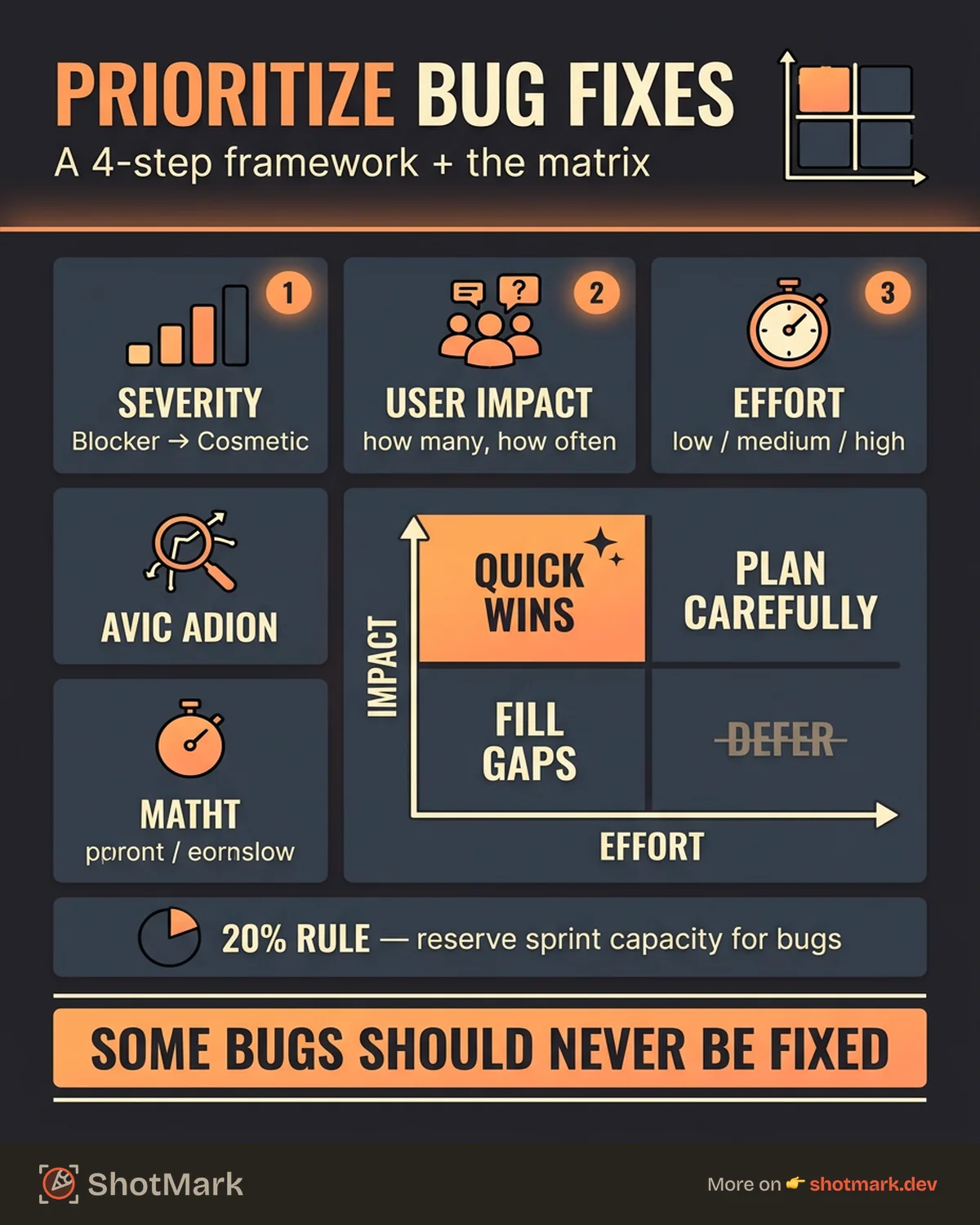
Step 4: Apply the Severity-Effort Matrix
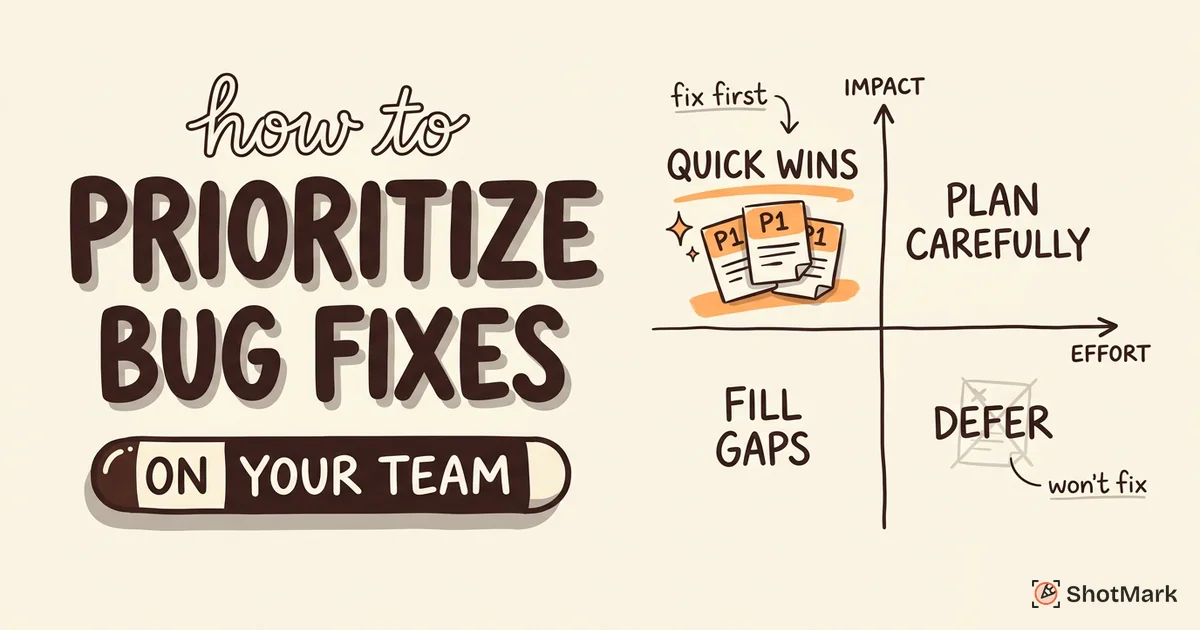
Combine impact and effort into a 2x2 matrix:
| Low Effort | High Effort | |
|---|---|---|
| High Impact | Fix first (quick wins) | Fix next (plan carefully) |
| Low Impact | Fix when convenient | Defer or won’t fix |
High-impact, low-effort bugs are your quick wins. Fix these immediately. High-impact, high-effort bugs need careful planning: they are important, but rushing them creates regressions. Low-impact, low-effort bugs can fill gaps between sprints. Low-impact, high-effort bugs belong in the defer pile unless the underlying issue is growing.
This framework gives every bug a clear position in your backlog, not based on who filed it or when, but on its actual cost-benefit ratio.
How Agile Teams Prioritize Bugs in Sprint Planning
Frameworks are useful. Fitting them into your actual sprint rhythm is where most teams struggle.
The 20% Rule
Many experienced engineering teams reserve roughly 20% of sprint capacity for bug fixes and tech debt. For a two-week sprint with 100 story points of capacity, that means 20 points allocated to bugs before feature work even starts.
This is not rigid. Some sprints need more bug time (post-launch stabilization). Some need less (greenfield development). The point is to budget for bugs explicitly rather than pretending they will not exist.
Bug Fix Sprints vs. Mixed Sprints
Some teams run dedicated bug fix sprints periodically, spending an entire sprint clearing the backlog. Others mix bug fixes into every sprint.
Both approaches work. Bug fix sprints are better for teams with large, neglected backlogs. Mixed sprints are better for steady-state maintenance. The wrong approach is ignoring bugs until they force a crisis sprint.
Using Bug Priority Levels
Jira’s bug management documentation recommends assigning priority levels (P0 through P4) that combine severity and business context. P0 bugs get fixed immediately, regardless of sprint boundaries. P1 bugs enter the current sprint. P2 bugs join the next sprint. P3 and P4 bugs live in the backlog until capacity opens up.
The bug priority levels your team uses matter less than applying them consistently. Whether you use P0-P4, High/Medium/Low, or a custom scale, the important thing is that every team member interprets the levels the same way. ProductPlan’s bug priority definitions offer a useful reference for standardizing your vocabulary.
Bug Triage Meetings That Actually Work
A triage meeting is where prioritization decisions get made. Run them well, and your team spends less time debating bugs and more time fixing them. Run them poorly, and you have added another meeting nobody wants.
Who Should Attend
Keep the group small:
- QA lead: Knows the bugs, has context on severity and reproduction
- Engineering lead: Understands effort estimates and technical risk
- Product owner: Represents business priorities and user impact
Three people. Four at most. Larger groups turn triage into a debate club.
What Data to Bring
Every person should come prepared:
- QA: New defects since last triage, with severity classifications
- Engineering: Effort estimates for the top 10 open bugs
- Product: User complaint volume, revenue impact data, upcoming release deadlines
Decision Outcomes
Every bug discussed should leave triage with one of four outcomes:
- Fix now: Goes into the current sprint
- Defer: Goes to backlog with a target sprint
- Won’t fix: Documented and closed
- Needs more info: Assigned back for investigation
If a bug leaves triage without a decision, it will sit in limbo until the next meeting. Do not let that happen.
Where Visual Context Speeds Up Triage
The biggest time sink in triage meetings is context-switching: reading a bug report, trying to understand what the reporter saw, asking follow-up questions, and attempting to reproduce the issue on the spot.
ShotMark reduces this overhead by attaching screenshots, console logs, and network request data to every bug report automatically. When triage attendees can see exactly what happened, decisions happen faster. For more on building effective triage processes, see our guide on how top teams run a bug triage process.
Tracking and Measuring Your Bug Fix Effectiveness
A prioritization framework only works if you measure whether it is producing results. Track these metrics monthly to calibrate your approach.
Defect Resolution Rate
Bugs closed divided by bugs opened per sprint. If this ratio is consistently below 1.0, your backlog is growing faster than you can address it. That means you need more bug fix capacity, better prevention (more tests, code review), or more aggressive “won’t fix” decisions.
Mean Time to Fix by Severity
Track how long each severity level takes from “opened” to “verified fixed.” If your blockers are taking a week to resolve, that is a staffing or process problem. If your minors are taking months, that is expected, but check that none of them have quietly escalated.
Linear’s approach to bug tracking emphasizes that mean time to fix is the single most predictive metric for team health. A rising MTTF signals process decay before it becomes visible in production incidents.
Customer-Reported vs. Internally-Caught Ratio
What percentage of your bugs are reported by customers vs. caught by your QA process? A healthy ratio leans heavily toward internal catches. If customers are finding more bugs than your team, your testing coverage needs work.
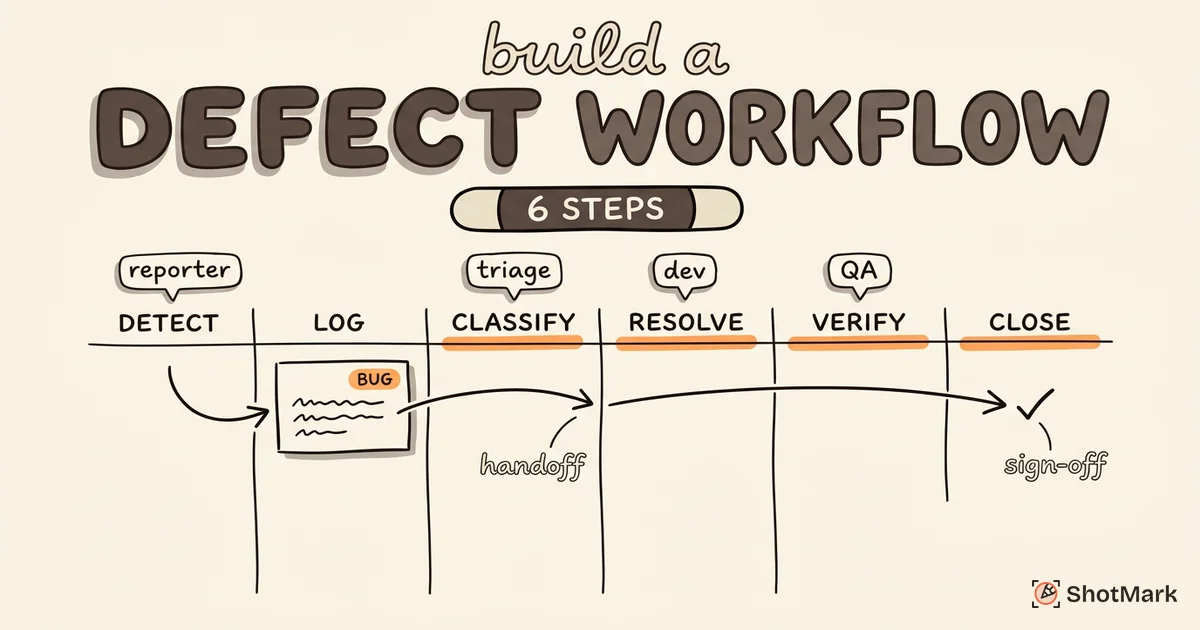
The bug life cycle includes a verification stage specifically designed to catch regressions before they reach users. Teams that skip this stage see their customer-reported ratio climb.
When to Revisit Your Framework
Revisit your prioritization framework every quarter or after major incidents. If a deferred bug later caused a production outage, your classification criteria need adjustment. If your quick-win quadrant is always empty, your effort estimates might be too conservative.
Your bug backlog will never hit zero. The goal of prioritizing bug fixes is making intentional, data-backed decisions about where your engineering time creates the most value. Start with the severity-effort matrix, run tighter triage meetings, and measure whether your fix rate keeps pace with your defect management process.
The teams that handle bug fixes well are not the ones with the fewest bugs. They are the ones who know exactly which bugs matter most right now.
Get new posts in your inbox.
One email when we publish: notes on QA, AI, and shipping faster. No spam, unsubscribe anytime.