Your Jira bug tracker is probably costing your QA team more time than it saves. After reviewing bug workflows at dozens of engineering teams, we found the same 8 mistakes showing up repeatedly, and every one of them has a straightforward fix.
Most Jira content focuses on setup. Teams read those guides, configure their projects, then discover six months later that their bug queue has ballooned to 400 open issues, triage takes two hours every Monday, and developers still complain that reports are unclear. The problem isn’t Jira. The problem is how QA teams use it as a bug tracker after the initial setup.
This post walks through the 8 mistakes we see most often, shows how to fix each one, and covers the metrics that tell you whether your Jira bug tracker is actually working.
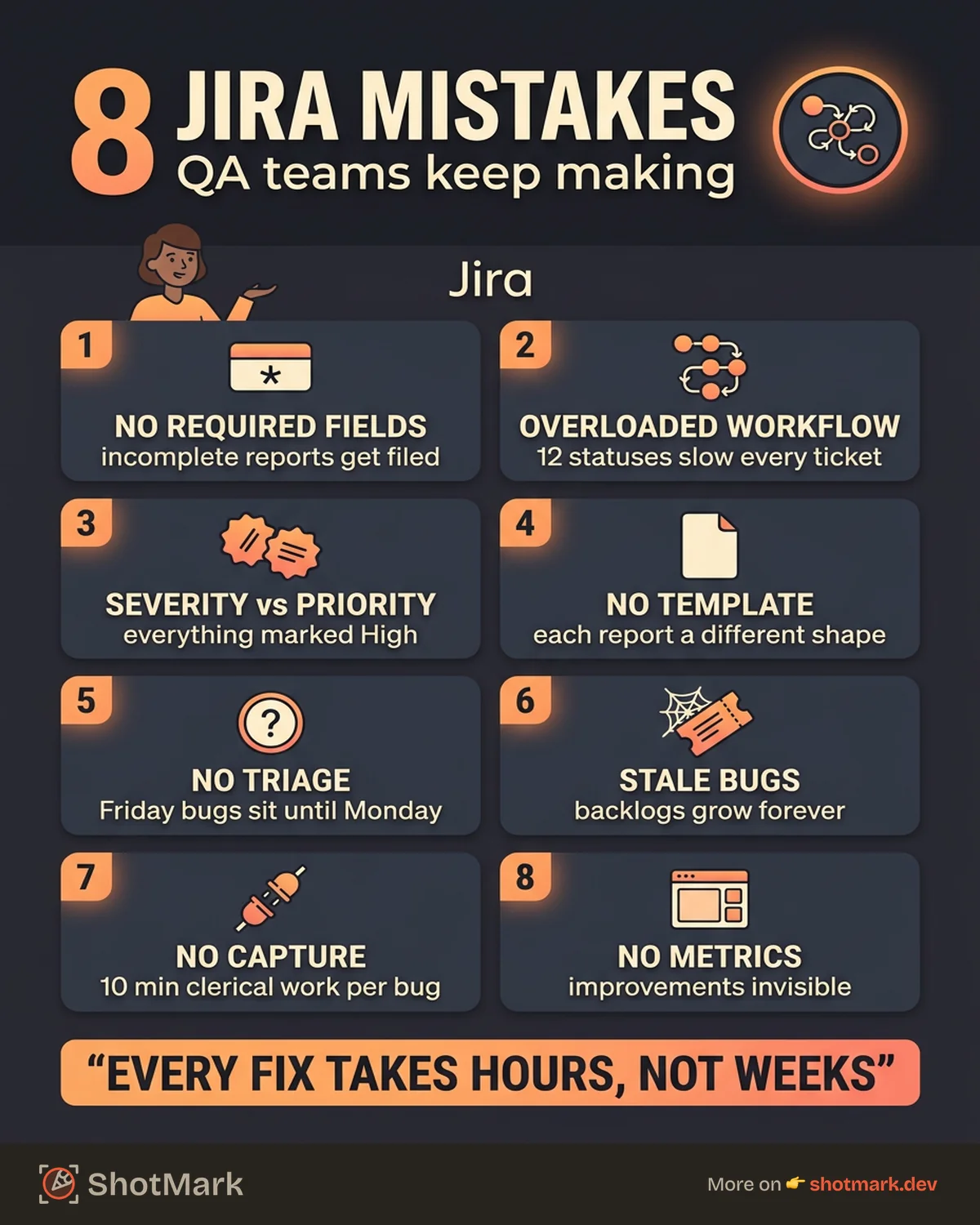
The 8 Most Common Jira Bug Tracker Mistakes
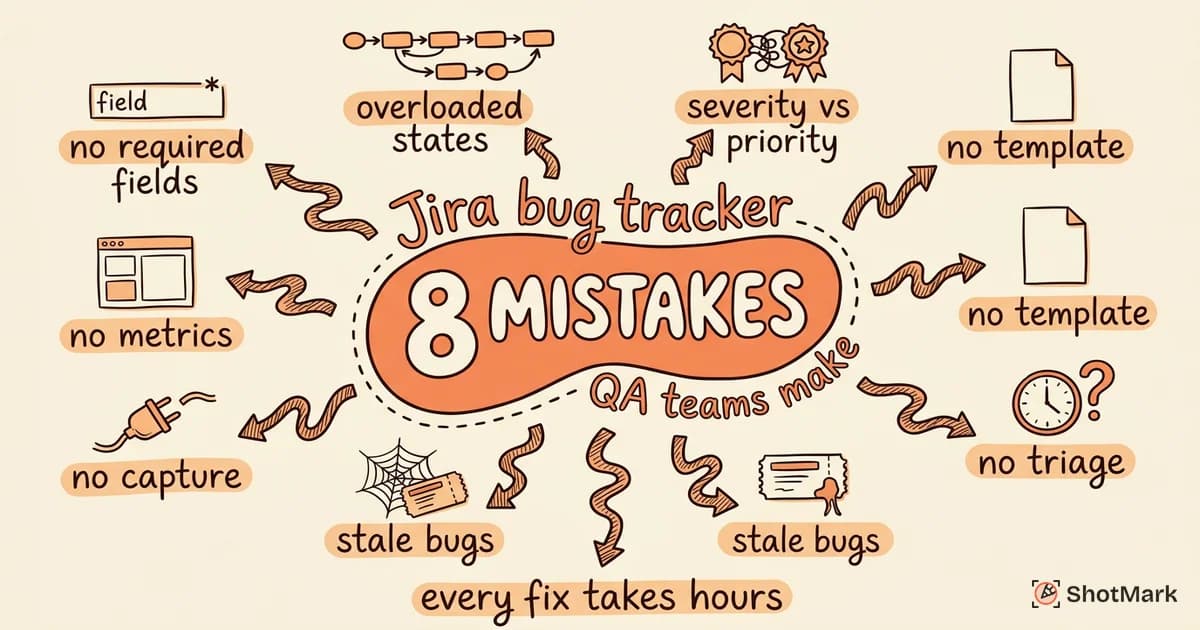
We see the same patterns across teams of 10 engineers and teams of 200. These are the eight mistakes that waste the most time.
Mistake 1: No Required Fields
The default Jira issue creation screen lets users submit a bug with just a summary. No steps to reproduce, no environment, no severity. Reports get filed with three words and a screenshot, then sit in the backlog until a developer asks clarifying questions.
The fix is configuring your screen scheme so that Steps to Reproduce, Environment, and Severity are required fields on the Bug issue type. If the reporter can’t fill them in, the ticket can’t be submitted.
Mistake 2: Overloaded Workflows
A bug workflow with 12 statuses (Open, Triaged, In Analysis, Ready for Dev, In Progress, In Review, In QA, Ready for UAT, In UAT, Ready for Release, Released, Closed) slows every ticket down. Engineers spend more time updating statuses than writing code.
Most teams need 5 or 6 statuses at most: Open, Triaged, In Progress, In Review, Done. Anything beyond that should be captured with a custom field or a label, not a workflow transition.
Mistake 3: No Severity vs. Priority Distinction
Many QA teams treat severity and priority as the same field. Everything gets marked “High” because everything feels important in the moment. The result is a backlog where nothing stands out and triage becomes meaningless.
Severity measures technical impact (Critical, Major, Minor, Trivial). Priority measures business urgency (Highest, High, Medium, Low). A typo on the homepage might be Trivial severity and High priority. A data-loss bug affecting 2% of users is Critical severity but maybe only Medium priority for this sprint. Both fields matter.
Mistake 4: Missing Bug Templates
When every bug report has a different structure, developers waste time parsing each one. Some reports have screenshots. Others have console errors inline. A few have reproduction steps. Most have none of the above.
Pre-formatted description templates solve this. Every bug report in Jira should start with the same structure: Prerequisites, Steps to Reproduce, Expected Result, Actual Result, Environment, Evidence. The template is a forcing function for completeness.
Mistake 5: No Triage Process
Bugs filed on Friday afternoon sit unlooked at until Monday standup. By then, three more bugs have arrived and the team lead skims them all in 10 minutes. Severity and priority get set hastily. Half the tickets go straight to the backlog and never come back out.
A proper triage process is a weekly or daily meeting with a JQL-based agenda: new bugs from the past seven days, unassigned critical bugs, and bugs with no activity in 14+ days. The meeting output is assignments and priority decisions, not discussion.
Mistake 6: Stale Bugs Never Cleaned Up
Open the average QA team’s Jira project and you’ll find tickets from 2023 still labeled “In Progress” because a developer forgot to close them. Backlogs grow indefinitely because nothing ever gets removed.
Stale bug automation fixes this. Set a Jira automation rule that auto-notifies the assignee on any bug with no activity for 30 days, and auto-closes bugs with no activity for 90 days. Real bugs come back. Forgotten ones disappear. The backlog reflects reality.
Mistake 7: No Integration With Capture Tools
QA engineers file bugs by taking a screenshot, switching tabs, opening dev tools, copying console errors, writing down the browser and OS, then pasting everything into Jira. Each bug takes 10 minutes of clerical work before the real reporting starts. Learn more about connecting capture tools to Jira to eliminate this entirely.
Browser extensions that capture screenshots, console logs, network requests, and environment data in one click can feed this context directly into Jira via API. The QA engineer writes reproduction steps and a summary. Everything else auto-fills. You can also check the Atlassian Community threads where teams share capture-to-Jira integration patterns.
Mistake 8: No Bug Metrics or Dashboards
Without metrics, you have no idea whether your Jira bug tracker is getting better or worse over time. Teams operate on vibes: “feels like we have a lot of bugs right now” or “feels like triage is slower than last quarter.”
A Jira dashboard with four gadgets (open bug count by severity, average time to triage, average time to fix, and reopen rate) tells you immediately whether the system is healthy. We’ll cover exactly which JQL queries to use later in this post.
How to Fix Your Jira Bug Workflow
Fixing these mistakes is mostly configuration work, not process change. Here’s the order we recommend.
Enforce Required Fields With Screen Configurations
Go to Project Settings > Screens, pick the screen used for Bug creation, and add Steps to Reproduce, Environment, and Severity as required fields. If you haven’t already done the work of setting up Jira for bug tracking from scratch, start there before layering on required fields.
The Atlassian bug tracking guide walks through the default field setup. Our recommendation goes slightly beyond the defaults by requiring Severity as a distinct field from Priority.
Simplify Your Workflow to 5 or 6 Statuses
Open Project Settings > Workflows and edit the default bug workflow. Remove statuses like “In Analysis,” “Ready for Dev,” “Ready for UAT,” and similar intermediate states. If you need to track those phases, use a custom field called “Sub-status” or similar.
The Jira workflow management documentation shows how to edit workflows without breaking existing tickets. The key is to migrate old tickets to the nearest equivalent status in the new workflow.
Implement a Weekly Triage Meeting
Block 30 minutes every Monday with the QA lead, engineering lead, and product owner. The agenda is driven by three JQL queries:
project = ABC AND created >= -7d AND type = Bug AND status = Openproject = ABC AND priority = Highest AND assignee is EMPTYproject = ABC AND updated <= -14d AND status != Done
Each ticket gets a quick severity/priority review and an assignment. No debate longer than two minutes per bug.
Set Up Stale Bug Automation
Use Jira Automation to create two rules. First rule: if a bug has no activity for 30 days, add a comment tagging the assignee and mark it as stale. Second rule: if a stale bug has no further activity for 60 days, auto-close it with a “closed due to inactivity” resolution.
Stale bugs reopen easily if someone cares. Real issues don’t disappear. The backlog stays meaningful.
Create a QA Dashboard
Build a Jira dashboard with four gadgets. Open Bugs by Severity (pie chart filtered by status != Done). Time to Triage (average days from creation to status change). Time to Fix (average days from In Progress to Done). Reopen Rate (percentage of bugs that transitioned Done > Open).
This dashboard answers the question “is our Jira bug reporting process getting better or worse?” without subjective debate.
Bug Reporting Best Practices for Jira
Configuration is only half the story. The other half is how QA engineers write the actual bug report in Jira.
Use Description Templates With Pre-Formatted Sections
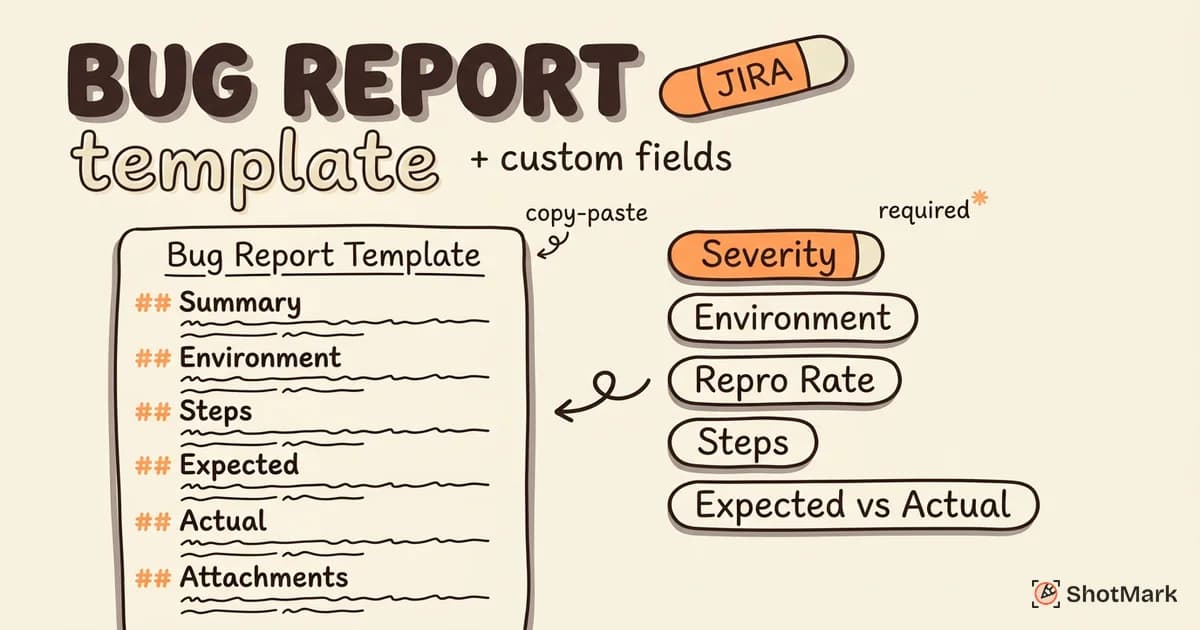
Every bug report should start with the same six sections: Prerequisites, Steps to Reproduce, Expected, Actual, Environment, Evidence. You can enforce this with a default description template on the Bug issue type, or use a Jira bug report template with custom fields for each section.
The template is not bureaucracy. It’s a checklist. QA engineers who follow it produce reports that developers can act on immediately.
Require Screenshots or Recordings for UI Bugs
A text description of a UI bug is almost always incomplete. “Button is misaligned” tells the developer nothing about which button, how much misalignment, or on which screen size. A screenshot with an annotation takes 10 seconds and replaces a 5-minute Slack thread.
Screen recordings work even better for bugs involving user flows, animations, or multi-step interactions. If your team relies on structured bug report best practices, visual evidence should be non-negotiable for any UI-related ticket.
Link Related Bugs to Surface Patterns
Jira’s “is related to” and “duplicates” link types help teams spot patterns. If three bugs in one sprint all touch the same checkout component, linking them surfaces the likely root cause. Without links, each bug gets investigated independently and the pattern stays hidden.
Train QA team members to search for similar bugs before filing a new one. A 30-second search prevents duplicate investigation and highlights systemic issues.
Use Labels Consistently
Labels are free-form and easy to abuse. Teams that don’t maintain a label vocabulary end up with 200 labels, most used once. Effective labels use a small, consistent vocabulary: browser:safari, platform:ios, component:checkout, regression, flaky.
Document your label conventions in a shared page and update the list quarterly. Labels that aren’t used get removed.
Train New QA Team Members on the Template and Workflow
New hires inherit bad habits unless someone actively teaches the system. Onboarding for QA engineers should include a 30-minute walkthrough of the bug template, the workflow states, and the triage meeting cadence. Pair the new hire with a senior QA for the first week of bug filing.
Measuring Bug Tracking Effectiveness in Jira
Without metrics, improvements to your Jira bug tracker are invisible. Here’s what to measure and how.
Key Metrics
Four metrics cover 90% of what you need to know about your bug tracking software health.
- Time to triage: Average time from bug creation to first status change. Target: under 24 hours for critical bugs, under 48 hours for everything else.
- Time to fix: Average time from In Progress to Done. Segment this by severity: Critical bugs should resolve in days, Minor bugs can take weeks.
- Reopen rate: Percentage of bugs that move from Done back to Open. A reopen rate above 10% indicates QA is closing tickets too fast or fixes aren’t being verified properly.
- Bugs per sprint: Count of new bugs filed during each sprint. A rising trend suggests quality issues upstream (code review, test coverage, or deployment process).
Building a Jira Dashboard for Bug Tracking Health
In Jira, create a new dashboard and add four gadgets mapped to the metrics above. Use Filter Results gadgets with saved JQL queries for each.
Share the dashboard with the engineering leadership and product team. Review it in sprint retros. Visibility alone drives behavior change: teams improve metrics they can see.
Using JQL Queries to Surface Problem Areas
JQL (Jira Query Language) is how you turn a vague concern into a concrete ticket list. A few useful queries:
- Bugs open for more than 30 days with no assignee:
project = ABC AND resolution = Unresolved AND assignee is EMPTY AND created <= -30d - Bugs reopened in the last 90 days:
project = ABC AND status CHANGED FROM "Done" TO "Open" AFTER -90d - Critical bugs in the current sprint:
project = ABC AND priority = Highest AND sprint in openSprints()
Save these as filters and reuse them in dashboards, alerts, and triage meetings.
Quarterly Bug Workflow Retros
Once a quarter, block 60 minutes with the QA lead, engineering lead, and product owner. Walk through the metrics dashboard. Identify one workflow change to try for the next quarter. Examples: reducing the SLA for critical triage, adding a new required field, or adjusting the stale bug automation threshold.
Retros keep the system from calcifying. Tools and teams both change. Your Jira bug tracker should evolve with them.
What Are Common Mistakes With Jira Bug Tracking?
The most common mistakes are missing required fields, overloaded workflows with too many statuses, treating severity and priority as the same field, no standardized bug template, no triage process, uncleaned stale bugs, no integration with capture tools, and no metrics dashboard. Each of these has a specific fix covered earlier in this post.
Why Do Jira Bug Reports Take So Long to Resolve?
Long resolution times usually trace back to incomplete initial reports (developers wait days for follow-up answers), unclear ownership (bugs sit unassigned), or triage bottlenecks (no regular cadence for reviewing new bugs). Fixing the capture side of the workflow compresses resolution time more than any process change on the engineering side.
How Do You Improve Bug Tracking in Jira?
Improvement comes from three areas: configuration (required fields, simplified workflow, stale bug automation), process (weekly triage, quarterly retros, onboarding training), and tooling (capture extensions that auto-fill Jira fields with technical context). Addressing all three at once produces compounding improvements.
What Comes Next
Fixing these Jira mistakes reduces bug resolution time and QA frustration. Every issue described above has a fix that takes hours, not weeks.
For the capture side of the workflow, ShotMark handles the context collection automatically. One-click capture of screenshots, console logs, network requests, and session replay, all packaged into a structured Jira ticket with auto-filled environment data. That eliminates the root cause of mistakes 1, 4, and 7 without changing your workflow. The SDK is open source, and you can join the waitlist at shotmark.dev to be notified when early access opens. A better jira bug tracker starts with better capture.
Get new posts in your inbox.
One email when we publish: notes on QA, AI, and shipping faster. No spam, unsubscribe anytime.